

Your sales reps sell. The CRM fills itself in.
Your best reps spend their evenings updating the CRM, and half of what gets agreed on falls through the cracks between visits. We're building an AI assistant that rides along with reps in the field: it plans routes based on what's bleeding revenue, surfaces customer context before every visit, and turns a post-meeting voice note into tasks and CRM entries.
Let's talk!

Voice notes instead of reports
AI captures the summary, tasks, and deadlines

Routes by business priority
Revenue drops and upcoming deadlines come first

Pre-visit briefing
Customer context pulled from Power BI and visit history

Follow-ups update the CRM on their own
Nothing falls through the cracks

Configured to fit your process
From simple notes to a full end-to-end workflow
An assistant that knows the territory — from the day's plan to the post-visit note
This isn't another system to log into. It's a layer that ties together the calendar, sales data, and the rep's own voice into a single workflow on their phone. The rep doesn't type anything — they talk, approve, and move on to the next stop.
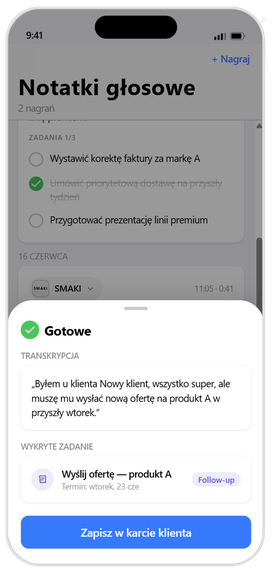
01 · VOICE → CRM
A voice note instead of a form
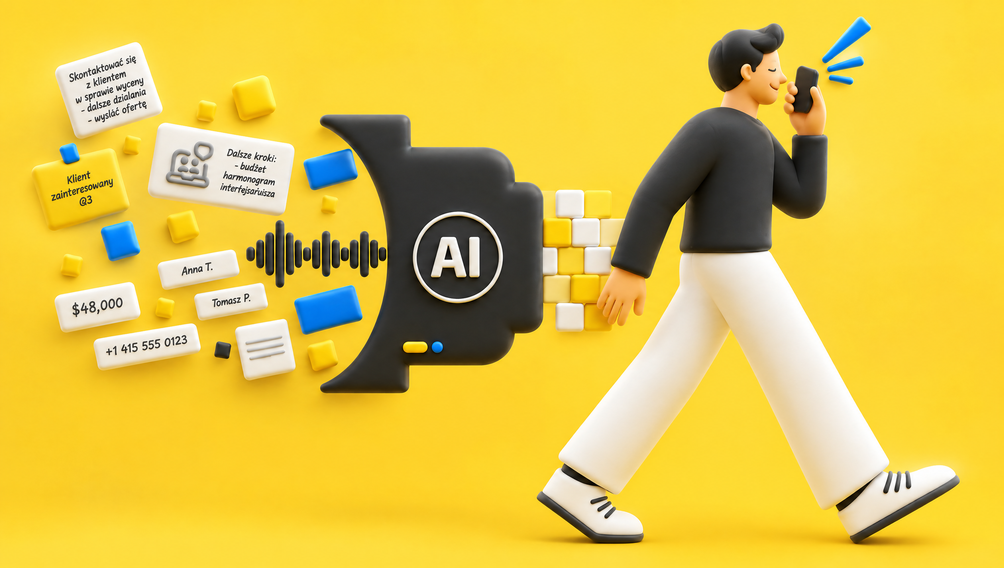
The rep records a quick clip, just a few dozen seconds, after the visit. Whisper transcribes it, Claude pulls out the summary, tasks, and deadlines, and suggests which customer the note should be linked to.
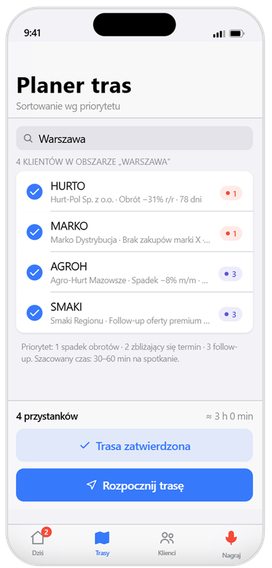
02 · DAY PLAN
A route built on priority, not on the map
The planner pulls together customers in the area and sorts them by signal: dropping revenue, an upcoming deadline, a pending follow-up. The rep heads out with an approved route already in hand.
03 · CONTEXT
Customer context, right on the phone
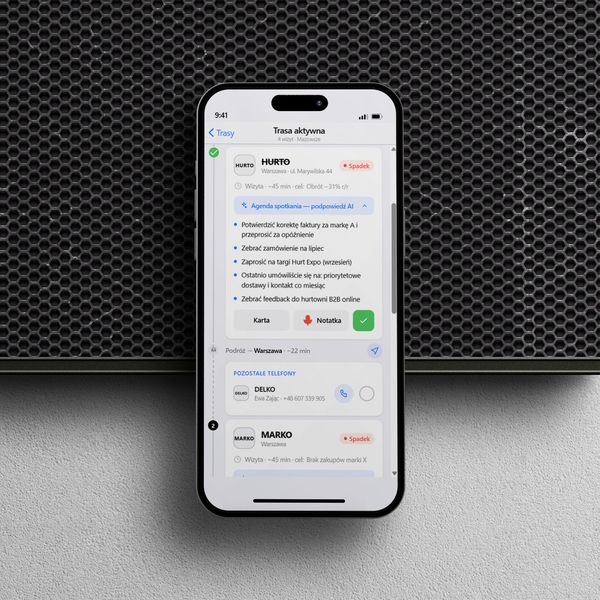
The customer card pulls revenue, target attainment, and days since the last visit straight from Power BI, while AI suggests the meeting agenda based on the history of past contact.
Less paperwork, more visits that actually move the numbers
We deploy an AI assistant tailored to your field team's process — from day planning, through pre-visit briefings, to automatic logging of agreements in the CRM. No need to rip out the systems that already work.
01
No more after-hours reporting
A voice note turns into a summary, tasks, and a CRM entry. The rep wraps up the day after the last visit, not back at a laptop.
02
Nothing agreed on gets lost
Every "send the quote," "schedule the delivery" becomes a task with a deadline, tied to the customer. The system remembers the follow-up so the rep doesn't have to.
03
Visits where revenue is actually slipping
Routes are built around drops, deadlines, and follow-ups. Customers who need attention now come first.
04
Ready for every meeting
The agenda and customer context are there before the rep walks in. The conversation starts with substance, not with figuring out who they're talking to.
05
Sales data that's always current
Integrated with Power BI, the calendar, and the CRM. Leadership sees target attainment in real time — data flows in from the field automatically.
06
Built around your process
We configure the scope of AI support to fit your sales cycle — from simple notes to a full route → visit → CRM workflow.
From the planner straight into navigation — selling starts the moment you're on the road
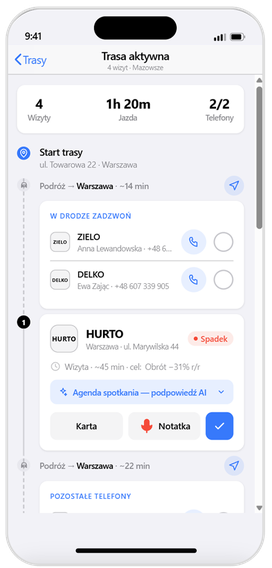
Route optimization doesn't stop at a customer list. We hand off the priority-ordered route to your phone's native navigation with a single tap — on both Android and iPhone. And while you're driving, the assistant doesn't just sit there: it surfaces concrete next steps right from behind the wheel, so the rep is already selling before they reach the first meeting. That might mean calling select customers with an AI-built talking-point plan ready to go, checking off completed calls, and arriving at the visit with the agenda already mapped out.
Route → navigation in one tap
Open your planned route in your phone's navigation app (Android and iPhone) — no copying addresses by hand.
"Call while you drive"
A list of calls to make along the route, each with an AI-generated talk plan. Call done? Check it off the list and watch your progress (1/2, 2/2).
Agenda on arrival
By the time you pull up, the assistant already has the meeting agenda ready, built from the customer's history — the rep walks in prepared.
Everything on one screen
Drive time, the next stops, the purpose of the visit, and remaining calls — no app-switching required.

build the route

navigate

call and sell along the way
The system knows where sales are slipping — and bumps the priority on its own
We ingest data from your existing sales systems — via API or flat file exports. That gives the assistant visibility into sales for every customer and how those numbers move over time. When revenue drops, it sends an alert in the app and automatically raises the priority of a visit or call to that customer. And if you've got guidelines requiring customer visits at least every so often, it'll flag upcoming deadlines and factor them into that day's route.
No data migration required
API or flat files (like an ERP export) — no need to swap out any existing system.
Sales over time, not a snapshot
The assistant tracks the revenue trend for each customer, not just where things stand today.
Drop alerts
A revenue decline triggers an in-app notification and bumps the priority of a visit or call.
Visit cycles under control
A "no less often than every X" rule keeps deadlines in check and feeds straight into the route.
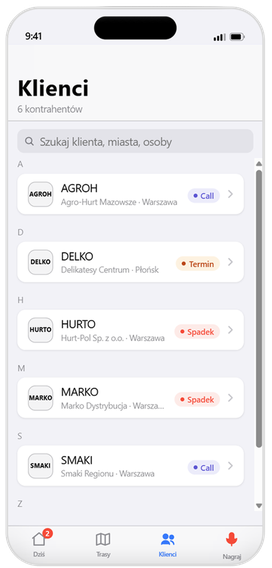
We'll show you on your own data.
A short workshop, one sales team, one measurable use case. You'll see the assistant in action before you make any decisions.
What We're Building for You
Where your policies call for it, voice notes are stored and processed on servers within the European Union — including with an EU-hosted AI model, such as Gemini. Data residency, access scope, and processing methods are all configured to meet the requirements of your legal and compliance team.
EU-based data storage
Voice notes and their processing are kept on servers within the European Union.
Access under control
We configure roles and access scope to match your security policy.
A human approves the AI
AI suggestions and actions require the rep's approval — nothing happens automatically.
EU-hosted AI model
We can run processing on a model available in EU regions — Gemini, for example.
What We're Building for You
The assistant doesn't force you to switch systems. We integrate via API (REST/GraphQL) with virtually any CRM, and wherever the provider offers an MCP server, we connect natively — faster, and with less integration overhead.
Official MCP server — read and write


API integration (REST / GraphQL)


MCP (read) or full API

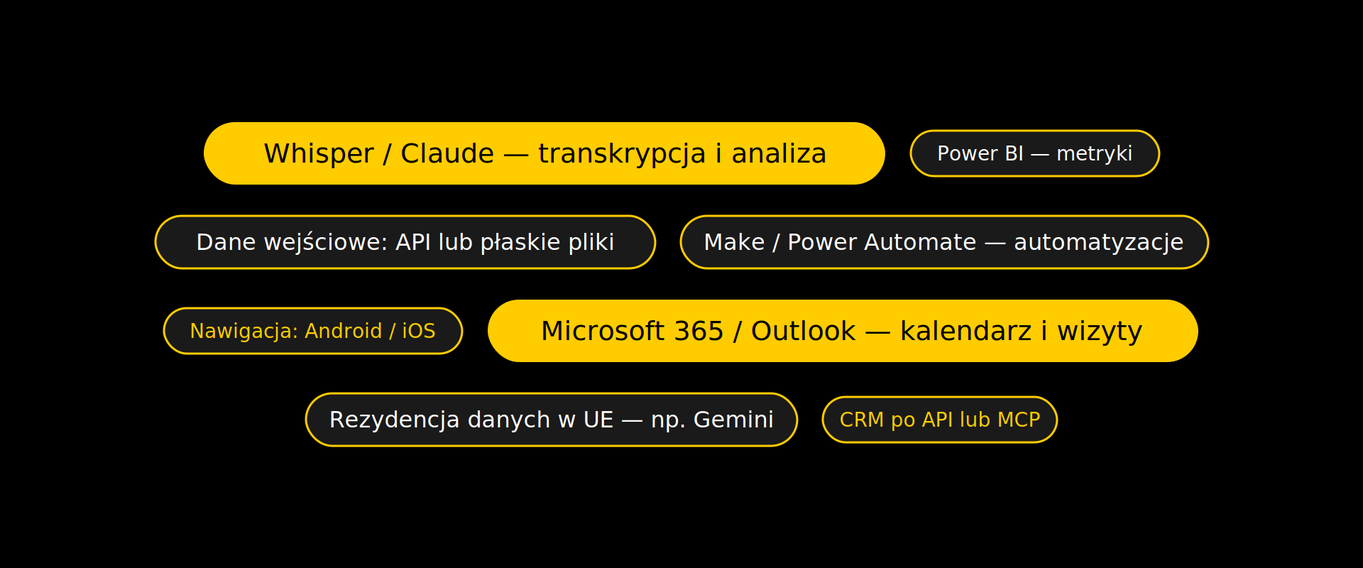
Proven AI models, wired into your existing systems
We're not building a black box. We connect proven AI models to the tools you already use, and we tailor the stack to your architecture — with the rep always staying in the loop as the one approving the AI's actions. The app runs on the phone in the field, even with spotty coverage.
Questions we hear most often
No. The assistant is a layer on top of your existing systems, not a replacement for them. We integrate with what you already have — Pipedrive, HubSpot, Salesforce, or your own ERP/CRM — via API or MCP. The rep gets one convenient interface on their phone, and the data lands right where leadership already analyzes it.
The planned, priority-ordered route is handed off to native navigation on both Android and iPhone. While driving, the assistant surfaces next steps right from behind the wheel — like calls to select customers with an AI-built talk plan, which you check off the list once they're done.
From your existing systems — via API or flat file exports (like an ERP export). The system tracks each customer's sales and how they change over time, sends alerts on revenue drops, and bumps the priority of a visit or call accordingly. If you have guidelines on visit frequency, it'll flag upcoming deadlines and factor them into that day's route.
Voice notes can be stored and processed on servers within the European Union, using, for instance, an EU-hosted AI model such as Gemini. We tailor the data residency and access configuration to meet the requirements of your legal and compliance team.
Yes, because the tool takes work off their plate instead of adding to it. A few dozen seconds of recording instead of filling out a form after hours is a real time-saver for the rep themselves. We handle rollout with onboarding and change management, so the team settles into the new habit from week one.
A working pilot with a single team or region typically goes live within a few weeks (we confirm the exact scope after the kickoff workshop). We start with the simplest, most measurable use case — like voice note → CRM task — so the value is visible right from the start.