

Seamless store migration: how to plan your cutover and mitigate risk
Are you planning to migrate your e-commerce shop? Find out how to plan the cutover, choose a strategy (big-bang vs strangler pattern) and monitor the first 72 hours after implementation, whilst minimising the risk of lost sales.
As of: Q2 2026
TL;DR:
Store migration is a high-stakes operation. Planning errors can lead to lost sales and a drop in Google search rankings.
Choosing your cutover strategy is crucial. The "big-bang" approach is a fast but risky deployment, while the "strangler pattern" offers a safer, gradual traffic migration.
A rollback plan, outlining the return to your old system, is absolutely essential. It must include clear checkpoints and a single person with the final decision-making authority.
The deployment window should ideally be scheduled during periods of lowest traffic, for example, midweek overnight. Avoid Fridays and promotional periods.
For the first 72 hours post-migration, intensive monitoring of technical metrics (uptime, errors), sales metrics (conversion, payments), and SEO (indexing, rankings) is critical.


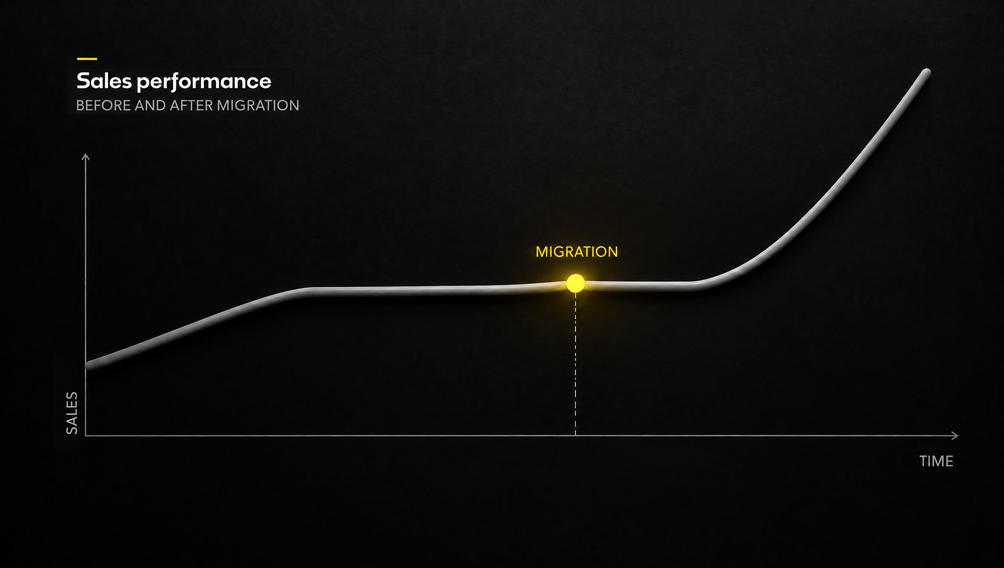
Migrating an online store to a new platform is akin to performing open-heart surgery on your business. It's an exciting moment, promising enhanced performance and new opportunities, yet it's fraught with immense risk. The biggest fear of any e-commerce manager is a scenario where, after flipping the switch, sales plummet, customers encounter errors, and years of carefully built Google ranking vanish overnight.
How can you execute this operation so the patient not only survives but emerges stronger? The secret lies in understanding that a successful migration isn't an act of courage on deployment day, but the culmination of hundreds of small, deliberate decisions made months in advance. It's not a matter of chance, but the result of strategy, contingency plans, and readiness for every scenario.
Migration strategies: Big- Bang or gradual takeover?
The first fundamental decision is choosing your approach to the cutover itself. Two main strategies are on the table: "big-bang" and "strangler pattern." The choice between them isn't a matter of preference, but a conscious assessment of your system's complexity, your risk appetite, and available resources.
Big-Bang: fast and risky
The "big-bang" strategy involves a one-time, complete switchover. The new system is built in isolation, and on deployment day, it replaces the old one in a single swoop. Imagine turning off an old car engine and immediately starting a new one. If it starts, great. If not, you're stranded.
This approach is appealing due to its simplicity and shorter project timeline. There's no need to maintain two systems simultaneously, which reduces costs. However, all risk accumulates in one critical moment. The new system must possess 100% of the old system's functionality from day one, requiring months of exhaustive User Acceptance Testing (UAT). There's no room for error. The "big-bang" makes sense when your store has relatively few integrations (fewer than 20) and a straightforward architecture.
Strangler pattern: gradual and secure
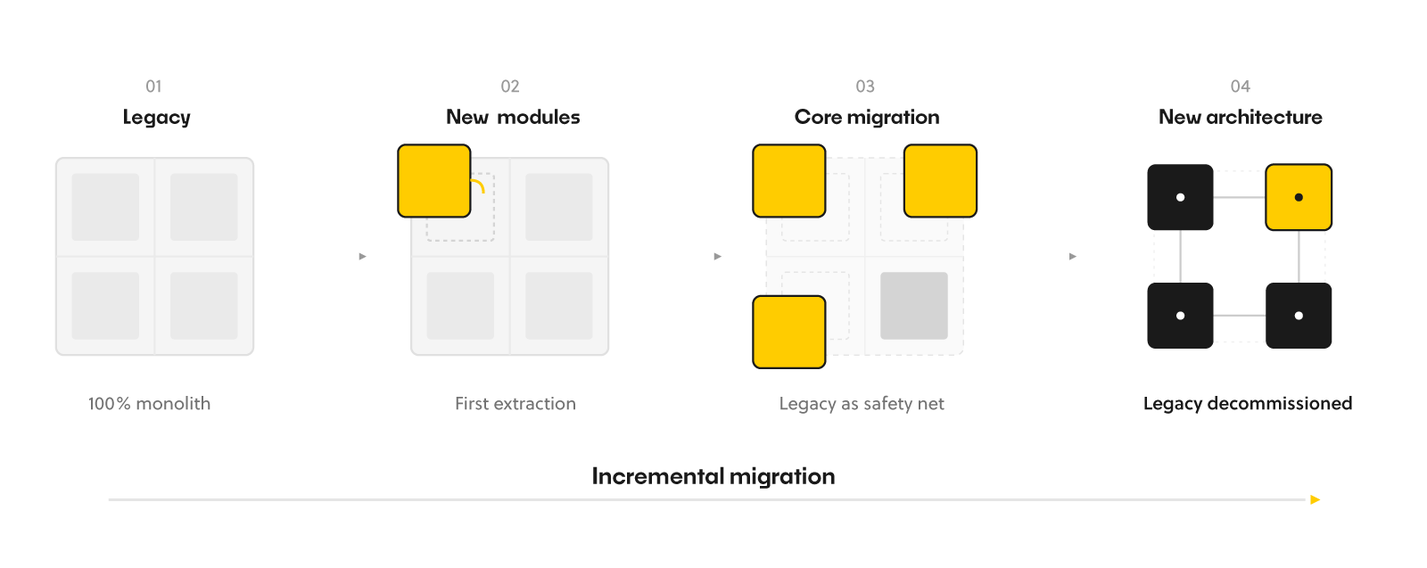
The strangler pattern, named by Martin Fowler, involves the gradual takeover of traffic by new components. The old system operates in parallel, and new features are launched incrementally. It's like building a new house around an old one and dismantling the old structure only when the new one is fully operational. An intermediary layer (proxy) directs traffic to either the old or new module. If you want to delve deeper into the topic, read our article on what a monolithic application is and why this pattern is so effective in its modernization.
The advantage is that risk is distributed over time. At each stage, you have a functioning old system as a safety net. You can compare the performance of both solutions and gather feedback before the project concludes. However, this approach is longer and more expensive to maintain because you're funding two platforms for a period. It's an ideal path for complex B2B systems, stores with many integrations (ERP, PIM), and custom logic. At BeeCommerce, we often recommend this approach, especially within a Composable Commerce architecture, where we build a modular ecosystem.
The table below compares the key differences between both strategies.
The choice of strategy dictates all subsequent planning. "Big-bang" requires flawless preparation for a single leap, while the "strangler pattern" is a marathon requiring continuous coordination of two parallel worlds.
If you’d like to explore this topic further, read our article on what a monolithic application is and why this pattern is so effective for modernising it.
The advantage is that risk is spread out over time. At every stage, you have the old system up and running as a safety net. You can compare the performance of both solutions and gather feedback before the project is completed. However, this approach takes longer and is more expensive to maintain, as you are funding two platforms for a certain period. It is the ideal path for complex B2B systems, shops with multiple integrations (ERP, PIM) and custom logic. At BeeCommerce, we often recommend this approach, particularly in a Composable Commerce architecture, where we build a modular ecosystem.
The table below summarises the key differences between the two strategies.
The choice of strategy determines all subsequent planning. The ‘big-bang’ approach requires perfect preparation for a single, decisive move, whilst the ‘strangler pattern’ is a marathon requiring constant coordination between two parallel worlds.
| Characteristic | Big-Bang | Strangler Pattern |
|---|---|---|
| Risk | High, concentrated at a single point | Distributed over time, lower at each stage |
| Deployment Time | Shorter, but intense | Longer, phased |
| Maintenance Costs | Lower during the project | Higher during the project (two systems) |
| Contingency Plan (Fallback) | None or very limited | Operational old system as fallback |
| Complexity | Lower in management, higher in testing | Higher in management, lower in testing |
| Recommendation | Smaller, simpler systems | Complex monoliths, B2B systems |
Planning a Secure Cutover: Minimizing Downtime
Regardless of the chosen strategy, the cutover moment itself must be planned with the precision of a military operation. This is where months of preparation face the ultimate test.
Deployment Window: When is the Best Time?
Choosing the right moment is crucial. The golden rule: deploy when store traffic is lowest, and your team is at full readiness.
Choose midweek. The best days are Tuesday, Wednesday, or Thursday, ideally during overnight hours. This provides full business days for potential reactions and fixes.
Avoid Fridays. The prospect of spending the weekend putting out production fires is the worst-case scenario for team morale.
Steer clear of peak periods. Black Friday, holidays, or the launch of a major marketing campaign are absolutely the worst times for a migration.
As AWS documentation rightly points out, the deployment window should be established during periods of lowest traffic to minimize user impact.
Rollback Plan: Your Safety Net
Let's be clear: an emergency rollback plan is the most important document in the entire project. It's like a parachute. You hope you'll never need it, but you must have it and know how it works.
A well-prepared rollback plan should include:
Defined checkpoints. At each stage of the cutover, you must know to what point you can safely revert.
Clear failure thresholds. What exactly constitutes a catastrophic failure that necessitates a rollback? A 20% drop in conversion? Payment failures for 15 minutes? A high 5xx error rate? This must be documented.
A single decision-maker. Amidst chaos and under pressure, there must be one person who has the final say on the rollback. This prevents decision paralysis.
Old system in "read-only" mode. After the new system launches, the old one should remain accessible in read-only mode for 48–72 hours. This allows for data verification and potential rapid restoration.
AWS emphasizes that well-planned rollback strategies can mean "hours instead of weeks of downtime" and "thousands instead of millions in lost revenue."
Communication: Clear and Timely
A cutover demands flawless communication. Who needs to know what, and when?
Appoint a communication lead. One person should be responsible for reporting status to the board and key stakeholders. This prevents information overload and chaos.
Prepare a contact list plan. Everyone involved (developers, marketing, customer service) must know who to contact in case of an issue.
Create a notification schedule. Establish when and whom to inform about the cutover's start, the completion of key stages, and the final launch.
Launch a dedicated communication channel. A shared Slack or Teams channel serves as a command center where everyone can track progress in real-time.
Effective communication management is crucial not only during migration. Learn more in our article on the dynamics of collaboration in e-commerce teams.
The first 72 hours after migration: What should you look out for to ensure a good night’s sleep?
It’s done. The new shop is up and running. But this isn’t the time to pop the champagne. This marks the start of the most crucial phase of the entire project. The first 72 hours are decisive, as this is when issues come to light that couldn’t have been anticipated in the test environment.
The First 72 Hours Post-Migration: What to Monitor for Peace of Mind
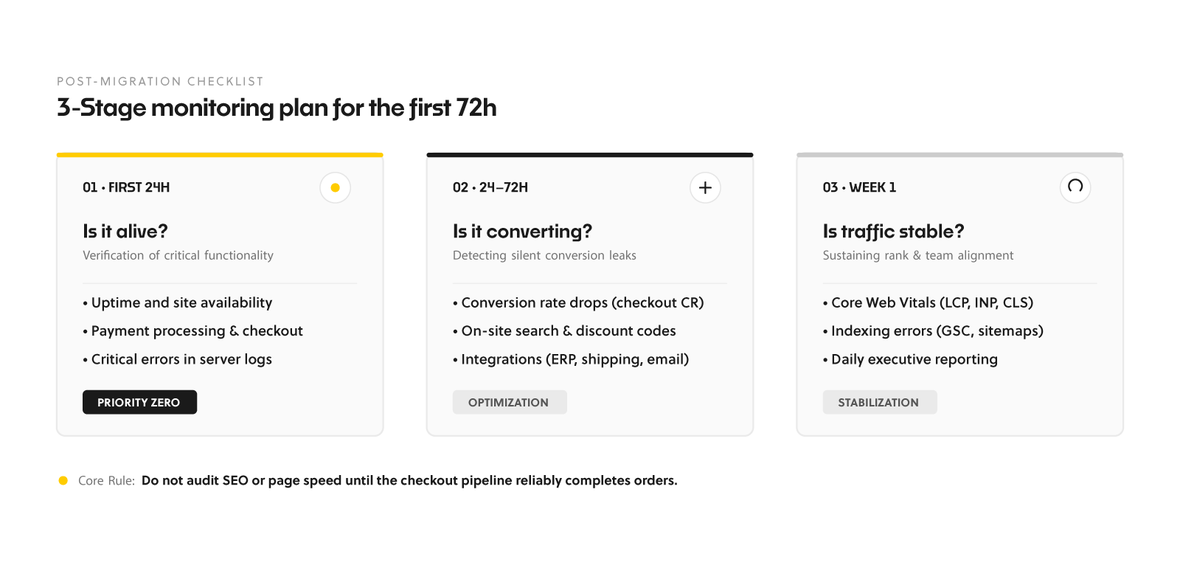
It's done. The new store is live. But this is no time to pop the champagne. This is the start of the most crucial watch in the entire project. The first 72 hours are decisive because that's when issues emerge that couldn't be foreseen in the test environment.
First 24 Hours: Operational Fundamentals
Focus on critical metrics that confirm the store is live and accepting orders.
Website Availability (Uptime): Is the site online? Use monitoring tools like UptimeRobot.
Error Logs: Are new, critical errors appearing in server logs?
Payments: Are transactions processing correctly? Verify this directly in your payment operator's panel.
Support Tickets: Has customer service seen a sudden spike in inquiries or complaints?
Analytics: Ensure that core parameters in Google Analytics are being collected correctly.
Next 48–72 Hours: Details and Optimization
Once you've confirmed the fundamentals are working, delve into deeper analysis.
Business Metrics: Monitor the conversion rate (CR) across key customer journeys. Even a migration without downtime can subtly degrade conversion due to a slower checkout or a non-functioning discount code. Also, check payment rejections and fraud flags.
Technical Metrics: Analyze the error rate on product pages, in the cart, and at checkout. Verify that the internal search isn't returning zero-results and that all integrations (fulfillment, mailing) are functioning correctly.
User Experience and SEO: Check Core Web Vitals. Ensure that LCP, INP, and CLS metrics are in the green, as poor page performance kills conversion and SEO. Daily, monitor Google Search Console for indexing errors and sitemap issues, especially if you're implementing Headless Commerce while maintaining SEO.
For the first week, prepare a daily report for decision-makers, including these metrics. This is the best way to rapidly detect alarming trends.
FAQ: Frequently asked questions about shop migration
The cost of migration depends on the size of the shop. For a small shop (up to 5 million PLN GMV per year), it is 80,000–200,000 PLN; for a medium-sized shop (5–30 million PLN), 200,000–500,000 PLN; and for a large shop (30–100 million PLN), 500,000–1.2 million PLN. The project takes between 3 and 10 months to complete.
Shopify Plus may not be sufficient if you require a bespoke user experience, extensive product configurators, advanced B2B features, or are planning to expand into multiple markets with specific requirements that native Liquid cannot support. In such cases, Shopify Hydrogen becomes the natural next step.
Yes, that’s a very sensible approach. Starting with an MVP or a pilot project reduces risk and speeds up the delivery of initial results. For example, you could migrate just the front-end for key purchase paths. Such a pilot project costs between 80,000 and 200,000 PLN and takes 2–4 months.
For a shop with an annual GMV of 50 million PLN, Shopify Plus remains cost-effective. However, if you are planning to expand into three or more markets or implement a B2B solution within the next 24 months, Composable Commerce or Magento Headless architecture starts to become more cost-effective from the second year onwards. It offers a 15–25 per cent lower TCO, no revenue-based fees and significantly greater flexibility.
W segmencie enterprise alternatywami dla Magento są platformy headless, takie jak commercetools, Saleor czy open-source'owy Medusa.js, który daje pełną własność kodu. Zazwyczaj łączy się je z headless CMS w rodzaju Storyblok Headless CMS oraz frontendem opartym na Next.js.
Migrating from Magento to a headless architecture typically takes between 12 and 20 weeks for a project of average complexity. The first measurable results, such as the launch of a key checkout flow with an LCP of less than 1.5 seconds, are visible after just 6–8 weeks.
Yes, in many cases, Legacy Code Refactoring is 3–5 times cheaper than a complete platform migration and does not require sales to be suspended. It is an excellent option for shops with a budget of 50,000–400,000 PLN that wish to improve stability and the pace of development without replacing the entire system.
In the first 72 hours, the key metrics are: uptime, payment success rate, error logs and the number of support tickets. After that, you should closely monitor the conversion rate, Core Web Vitals (LCP, INP, CLS), SEO errors in Google Search Console and the correct functioning of all integrations.
Conclusion: Preparation is Key to Success
Store migration is not a sprint, but a marathon with a very steep uphill climb at the end. Success doesn't depend on how quickly you hit the "launch" button, but on how well you've prepared for every possible scenario. Choosing the right strategy, precisely planning the deployment window and contingency plan, and conducting intensive post-launch monitoring are the foundations that differentiate a smooth transformation from a costly catastrophe.
Remember, investing in thorough preparation isn't an expense; it's an insurance policy for your business continuity. With it, you can focus on the benefits of your new platform instead of continually putting out fires.


Sources
How to migrate to composable with a faster ROI with the strangler pattern (Commercetools, 2025)
Migration Rollback Strategies: When Your Migration Doesn’t Go as Planned (AWS, 2024)
Ecommerce Platform Migration: A Phase-by-Phase Technical Checklist for 2026 (OurCodeWorld, 2026)
Facing an e-commerce platform migration decision and want to avoid downtime? Contact BeeCommerce: contact@beecommerce.pl. We'll help you choose the optimal migration strategy, plan a secure cutover, and prepare a monitoring plan. We always start with a technology audit (4–6 weeks, $7,500–$15,000), which provides a concrete estimate of the scope and costs.
Let's talk about potential areas of collaboration!
Hi!
during the first consultation we'll analyze your goals through the lens of ROI and operational risk. Whether we're building an Enterprise system, an application, or an AI automation — together we'll plan an architecture that eliminates your technical debt and unlocks scalability.


Więcej artykułów na ten temat znajdziesz na naszym blogu

AI in field sales: how an AI assistant is reshaping the Rep's job and company results in 2026
Discover how an AI sales assistant automates reporting, optimizes routes, and boosts sales efficiency. Stop spending evenings updating your CRM.
10 min
Read more

Clickable prototype over a 50-page spec in e-commerce
Why a clickable backoffice mockup speeds up board decisions in e-commerce projects and cuts implementation risk. A practical guide.
9 min
Read more
ERP, PIM, and CRM in Headless Architecture: How Integrations Drive Implementation Success in 2026
Picture running a large online store. Customers place orders, products ship out, inventory levels shift, and your marketing team plans new campaigns. For…
12 min
Read more