
ERP, PIM, and CRM in Headless Architecture: How Integrations Drive Implementation Success in 2026
TL;DR – In Short
Integrating ERP, PIM, and CRM systems forms the backbone of cohesive e-commerce in a headless setup. It ensures consistent data and smooth operations.
Integration errors can inflate budgets by up to 215% in ERP/CRM projects and cause 70% of projects to miss their business goals.
Key integration patterns include event-driven (for real-time sync), batch (for periodic updates), and real-time API.
Common pitfalls are undefined processes, unclear data ownership, and insufficient integration testing.
Headless architecture simplifies integrations with its API-first approach, but it still needs careful planning to avoid traps.
A discovery phase, costing 30,000–60,000 PLN over 4–8 weeks, is the first step to minimize risk and build a concrete integration plan.


Picture running a large online store. Customers place orders, products ship out, inventory levels shift, and your marketing team plans new campaigns. For everything to run smoothly, you need many systems talking to each other. Without that communication, chaos quickly follows: customers get outdated info, orders disappear, and you lose money and trust. In a headless architecture, where you have full freedom to pick your tools, integrating your ERP, PIM, and CRM systems becomes key to success.
Here, we'll explain what these systems are, why their communication is so important, and how to avoid common mistakes that can derail your project. We'll also look at how BeeCommerce helps plan and execute these complex processes.
Understanding the Basics: ERP, PIM, and CRM Explained
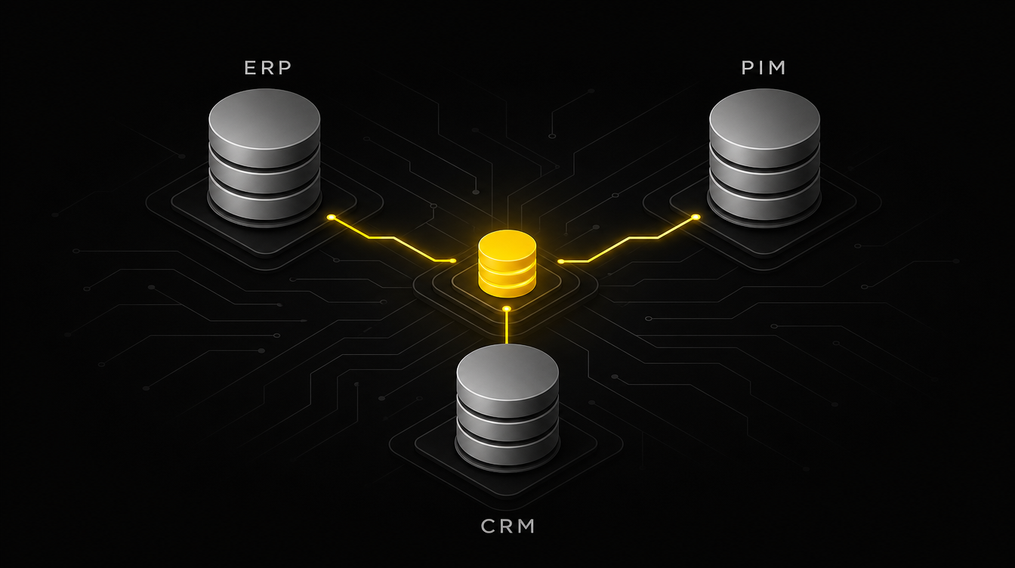
Before diving into integrations, let's understand what each of these core systems does. Think of them as different departments in your company that need to work together.
ERP (Enterprise Resource Planning): The Operational Core
Your ERP system acts like your company's brain. It's where you manage finances, accounting, inventory, supply chain, and often orders and production. ERP gathers data from various departments and integrates it to give you a full picture of your operations. Without an ERP, it's hard to imagine a medium or large business functioning.
What does an ERP do?
Manages orders and invoices.
Tracks inventory levels.
Handles finances and accounting.
Plans production and logistics.
PIM (Product Information Management): Your Product Data Hub
PIM is your command center for product information. Imagine having thousands of products, each with its own description, photos, attributes, color or size variants, and in multiple languages. PIM collects, organizes, and distributes all this data to other systems, like your online store or catalogs. With PIM, you ensure your products are presented consistently and professionally across every sales channel.
What does a PIM do?
Stores and organizes detailed product data.
Manages images, videos, and multimedia files.
Allows translation of descriptions into multiple languages.
Provides consistent data to all sales channels.
CRM (Customer Relationship Management): Your Customer Relationship Engine
CRM is your company's memory for every customer. It's a tool that helps you manage those relationships. In CRM, you'll find purchase history, customer service interactions, preferences, and even marketing communication data. This lets you build lasting relationships, personalize offers, and reach audiences more effectively.
What does a CRM do?
Stores customer contact details and history.
Tracks interactions (emails, calls, chats).
Helps segment customers and personalize communication.
Supports sales and customer service.
The table below shows how these systems complement each other in a typical e-commerce setup.
This table clearly shows each system has its specialty. Their strength lies in collaboration, not in trying to replace one with another.
| System | Main Role | Example Data | Users |
|---|---|---|---|
| ERP | Operational management (finance, inventory, orders) | Inventory levels, base prices, accounting data, order statuses | Finance, logistics, sales departments |
| PIM | Product information management | Descriptions, attributes, images, variants, product translations | Marketing, product managers, e-commerce |
| CRM | Customer relationship management | Customer data, purchase history, interactions, preferences | Sales, marketing, customer service |
Friction Points: Where Integrations Hurt Most
When these three systems need to communicate, problems often arise. It's a bit like trying to coordinate an orchestra where every musician plays from different sheet music. Industry reports show 70% of CRM projects fail due to poor user adoption, not technical issues. Similarly, 70% of ERP implementations miss their goals. This highlights that people and processes are often more critical than technology.
Common friction points include:
Data Conflicts: Who 'owns' the data? If a product's price differs between ERP and PIM, which system is correct? Without a clearly defined 'Single Source of Truth,' discrepancies quickly emerge. The rule 'master data entered into PIM should not be changed there' is crucial for data ownership.
Synchronization Delays: When a customer buys the last product in your online store, that info needs to hit the ERP immediately (to update inventory) and the PIM (so the product disappears from the site). Delays can lead to selling out-of-stock items, frustrating customers.
Lack of Consistency: Different customer info in CRM versus the order management system. This causes disorganization and a lack of personalized communication.
Headless Architecture Challenges: Headless architecture offers immense freedom to pick best-of-breed tools. That's great, but it also means you're responsible for making those tools talk to each other. You need to plan and build those integration bridges. It's a conscious choice requiring a strategic approach.
Integration Patterns: Pick the Right One for Your Business
Systems can communicate in various ways. Choosing the right integration pattern depends on how quickly data needs updating and how complex your processes are. Organizations using a hybrid approach (several patterns at once) report about 45% better system availability.
Event-Driven Integration (Real-time)
This is like a real-time conversation. When something happens in one system (e.g., inventory changes), it immediately sends an 'event' to other systems, which then react.
How it works: System A sends an event ('product X sold out'). System B (online store) immediately receives it and updates the product status.
When it works: For critical data that must always be current, like inventory levels, order statuses, or prices.
Pros: Instant updates, high data consistency.
Cons: Complex to implement, requires robust infrastructure.
Batch Integration (Periodic)
This is like sending reports periodically. Data is collected over a period, then sent and updated in other systems at specific intervals (e.g., daily, hourly).
How it works: System A gathers all price changes from the last 24 hours. At midnight, it sends this data to System B (PIM), which updates it.
When it works: For data that doesn't need immediate updates, like adding new products or description changes.
Pros: Simplicity, lower implementation costs.
Cons: Data update delays, risk of outdated information.
Real-time API Integration
An API (Application Programming Interface) is a set of rules allowing different applications to communicate. In real-time API integration, systems 'ask' each other for data when they need it.
How it works: When a customer in your online store wants to add a product to their cart, the store queries the ERP for current price and availability. The ERP responds in real-time.
When it works: For interactive processes like shopping carts, personalization, or checking product availability.
Pros: Flexibility, immediacy, enables building complex functionalities.
Cons: Dependency on API availability, requires robust error management.
The table below summarizes the key characteristics of integration patterns.
Choosing the right pattern isn't a technical decision; it's a business one. It must reflect your company's real needs and customer expectations.
| Integration Pattern | Update Speed | Implementation Complexity | Typical Applications |
|---|---|---|---|
| Event-Driven | Instant | High | Inventory levels, order statuses |
| Batch | Periodic (e.g., daily) | Low | Product imports, description updates |
| Real-time API | Instant (on-demand) | Medium | Shopping cart, personalization, prices |
Common Integration Mistakes and How to Avoid Them
System integrations are among the riskiest IT projects. Industry analyses, like Panorama Consulting reports, show the average budget overrun for ERP implementations is 215%, with only 32% finished on time. Over 60% of CRM implementation failures stem from human and process factors, and only about 10% from technology. This clearly shows that success hinges on solid planning and management, not just technology.
Must-Haves:
Undefined Business Processes: Integration shouldn't be a substitute for defining processes. If you don't know how your company works on paper, integration will only hardcode existing chaos. Solution: Start with an audit and process mapping.
Lack of Data Ownership: This causes most synchronization errors. If it's unclear which system is the 'source of truth' for a given data field (e.g., product name), conflicts will arise. Solution: Establish a 'Single Source of Truth' rule for each data field and document it clearly.
Insufficient Integration Testing: Integrations are complex. Testing only the 'happy path' is a recipe for disaster. You must test error scenarios, heavy loads, and unusual cases. Solution: Implement comprehensive integration tests (unit, end-to-end, performance) before launch.
Neglecting API Error Handling: What happens if one system doesn't respond? How do you handle duplicate orders? Technical solutions like idempotency keys and correlation IDs are essential for ensuring resilience and data consistency. Solution: Plan error handling, retry mechanisms, and logging from the project's start.
Nice-to-Haves:
No Buffer for Unforeseen Issues: Integration projects rarely go as planned. Surprises always pop up. Solution: Plan extra time and budget (a minimum 20% buffer).
Underestimating Team Role and Communication: Integration is a human project. If business and IT teams don't collaborate, even the best technology will fail. Solution: Invest in communication, training, and change management.
The table below presents common integration errors and recommended solutions.
Remember, technology is just a tool. Solid preparation and project management determine its success or failure.
| Integration Error | Consequences | Recommended Solution |
|---|---|---|
| Undefined processes | Chaos, duplicating disorganization, inefficiency | Process audit, mapping, standardization |
| No data owner | Conflicts, inconsistency, incorrect decisions | Establish a "Single Source of Truth" for each field |
| Insufficient testing | Production errors, data loss, frustration | Comprehensive integration and performance tests |
| No API error handling | Downtime, duplicates, data corruption | Idempotency keys, correlation IDs, retry mechanisms |
| No time/budget buffer | Overruns, delays, stress | Plan a minimum 20% buffer, flexibility |
Headless Architecture and Its Role in Integration Success
In a headless architecture, the frontend (what the customer sees) is separate from the backend (business logic, data). This allows you to freely choose the best solutions for each e-commerce component. This API-first approach makes integrating ERP, PIM, and CRM in a headless setup easier and more flexible.
Flexibility: You can integrate any system that offers an API, without adapting to monolithic platform constraints.
Scalability: Each module (e.g., PIM, CRM) can be developed and scaled independently, increasing the overall architecture's resilience.
Development Speed: Teams can work on different modules in parallel, accelerating new feature releases.
For example, at BeeCommerce, we help build Composable Commerce, integrating best-in-class tools like Storyblok (for CMS), Magento 2 (for e-commerce backend), or Shopify Hydrogen (for frontend). We weave all this into a cohesive ecosystem that functions as a single organism.
The costs and time for complex headless integrations can be significant, but they offer long-term benefits. Implementing a Composable Commerce architecture is an investment ranging from 500,000 – 3,000,000 PLN, with a 6 to 12-month implementation timeline. The first visible impact (e.g., a new module in production) can be seen within 12–16 weeks. This shows that while the initial investment is larger, the return comes from flexibility and the ability to quickly react to market changes.
FAQ
Headless commerce is an architecture where the presentation layer (frontend, what the customer sees) is separate from the business logic layer (backend, store logic, database). They communicate via APIs, giving companies greater flexibility and freedom to create unique customer experiences.
Integrating these systems is crucial because it ensures data consistency across the company, automates processes, and eliminates manual data entry. This helps you avoid errors, save time, and make better business decisions, leading to improved customer service and operational efficiency.
The cost of implementing complex headless integrations for a medium or large e-commerce business is a significant investment. For Composable Commerce, an architecture with many integrated systems, prices start from around 500,000 PLN and can go up to 3,000,000 PLN, depending on the project's scale and complexity.
Common mistakes include undefined business processes, unspecified data ownership for each field, insufficient integration testing, and a lack of API error handling mechanisms. Human and communication factors are also often underestimated.
Event-driven integration works in real-time, instantly reacting to changes in one system and propagating them to others. Batch integration collects data over a period, then sends and updates it in other systems at specific intervals, like once a day.
It's crucial to establish a 'Single Source of Truth' for each data type. For instance, ERP might be the source for inventory levels and prices, PIM for product descriptions, and CRM for customer contact details. Every data field should have a clearly assigned 'owner'.
Yes, BeeCommerce specializes in planning and implementing complex headless integrations. We start with a discovery phase (4–8 weeks, 30,000–60,000 PLN), where we analyze your processes, systems, and needs to create a concrete action plan and cost estimate.
Summary + Decision Framework
Integrating ERP, PIM, and CRM systems is the backbone of any modern e-commerce, especially within a flexible headless architecture. While it's a complex undertaking, fraught with risks – particularly those tied to people and processes, not just technology – its success dictates data consistency, operational efficiency, and customer satisfaction.
Success hinges not just on choosing the right technologies, but primarily on clearly defining business processes, establishing data ownership, and thorough testing. Remember, investing in meticulous planning early in the project (e.g., the discovery phase) saves costs and time in the long run.
Decision Criteria:
Start with Processes: Before you even think about technology, map your business processes and identify the data critical to them.
Establish Data Ownership: For each data field, designate one system as the 'Single Source of Truth'.
Choose Integration Patterns: Match patterns (event-driven, batch, API) to your business requirements, considering speed and complexity.
Test, Test, Test: Don't skimp on integration testing and error scenarios.
Manage Change: Prepare your team for changes and provide adequate support.
Facing the challenge of integrating systems in a headless architecture? Contact BeeCommerce: contact@beecommerce.pl. We can help with a technology audit, TCO calculation, and preparing recommendations for your board. We always start with a technical audit (4–6 weeks, 30,000–60,000 PLN) – a concrete estimate of scope and costs.


Sources
Panorama Consulting Group, 2025 ERP Report — (przykład, dokładny link do raportu lub nowszej wersji powinien być zweryfikowany)
Gartner, "Critical Capabilities for CRM Lead Management" (przykład, dokładny link do raportu lub nowszej wersji powinien być zweryfikowany)
Pimcore, "Master Data Management Best Practices" — (przykład, dokładny link powinien być zweryfikowany)
Workato, "The State of Enterprise Integration" (przykład, dokładny link do raportu lub nowszej wersji powinien być zweryfikowany)
Web.dev, "Core Web Vitals" — https://web.dev/articles/vitals
Shopify Plus, "Pricing" — https://www.shopify.com/plus/pricing
Honne Discovery Call — 30 minutes with our expert.
No presentations, no pitch decks. We talk about your business goals, what's holding you back, and whether starting the project is even worth it. Sometimes our best recommendation is "don't do this" and save money.


Więcej artykułów na ten temat znajdziesz na naszym blogu

AI in field sales: how an AI assistant is reshaping the Rep's job and company results in 2026
Discover how an AI sales assistant automates reporting, optimizes routes, and boosts sales efficiency. Stop spending evenings updating your CRM.
10 min
Read more

Clickable prototype over a 50-page spec in e-commerce
Why a clickable backoffice mockup speeds up board decisions in e-commerce projects and cuts implementation risk. A practical guide.
9 min
Read more
Seamless store migration: how to plan your cutover and mitigate risk
Planning an e-commerce store migration? Learn how to choose a cutover strategy (big-bang vs. strangler), minimize downtime, and monitor the first 72 hours post-launch to protect your sales and rankings.
12 min
Read more